An AI employee
for your customers
Answers using company knowledge, clarifies requests and passes complex inquiries to your team.
AI configured
for your business
We review your process, configure an AI employee and support it after launch.
Choose a process
Define which inquiries AI handles and what your team receives
Prepare the employee
Connect company knowledge, set communication rules and configure actions
Support its work
Maintain the employee and make small changes within the subscription
Work you can
assign to AI
First inquiry
Answer questions about your services and clarify the request
Prepare for a conversation
Collect the information your team needs
Customer service
Answer using company policies or the relevant instructions
Complex question
Pass the request and conversation history to the person responsible
We choose the tasks, channels and actions for your process.
What AI handles
and when people step in
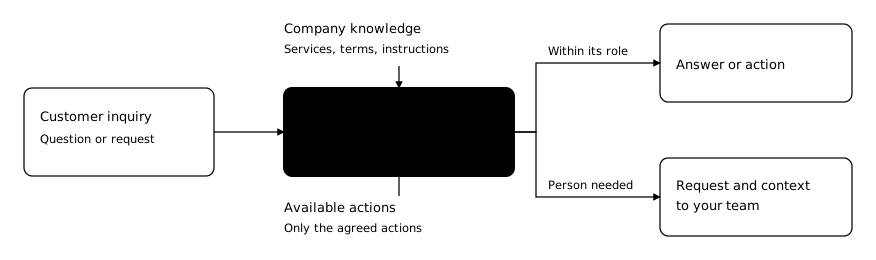
Its role, knowledge and access define what it can do on its own.
The customer gets in touch
The customer asks a question or submits an inquiry.
AI clarifies the request
The employee uses company knowledge and only the agreed actions.
Within its role
AI answers or carries out an available action.
When a person is needed
AI passes the request and conversation context to your team.
We agree the role, access and handoff conditions before launch.
From a conversation
to a task for your team
Customer conversation
Customer
We want AI to handle incoming inquiries.
AI employee
Which customer questions should it handle?
Customer
Services and prices. We need to discuss the setup.
What your team receives
Task: handle incoming inquiries.
Topics: services and prices.
Next step
Discuss the setup with the customer.
Illustrative setup inquiry. The dialogue was written to explain the process.
Your team sees the history
and takes over
01
Conversation history
Read the dialogue and understand what the customer needs
02
Handoff to a person
Find inquiries that need your team’s attention
03
CRM in the panel
Open a lead record and see its current stage
How work flows in the Neurobots panel, based on the product demonstration.
Company knowledge
and actions in your systems
What the employee knows
Your services and terms.
Service policies, opening hours and contacts.
Answers to common questions.
Actions we configure
Save information from a conversation.
Pass a request to the person responsible.
Use a connected system for the chosen task.
We check compatibility with your CRM and other systems before connecting them. Conversation and panel languages are selected separately.
When your team
steps in
Reasons for a handoff
The knowledge base has no answer
A dispute or conflict arises
The decision falls outside the role
What we pass to your team
The customer’s request, conversation history and required next step.
We define who receives the handoff and how it works. We check that the inquiry reaches the person responsible.
Setup, testing
and acceptance
From reviewing the task to handing a tested employee over to your team.
Discovery
Task and scope
Setup
Knowledge and
connections
Testing
Workflows and
exceptions
Accept & launch
Client approval
Before setup
Agree the workflow, materials, access and acceptance criteria.
Before launch
Show the test results and explain how your team will work with the employee.
We define the schedule and scope in your order. Acceptance and permission to launch are agreed separately.
Support
after launch
Up to 2 hours
per month for each AI employee
In the subscription
Support and small changes to the agreed workflow or knowledge
Quoted separately
New features, new connections and additional work
We record requests and changes, then retest any workflows we change.
How we check
the results
Answer accuracy
Compare answers with your company’s materials
Request completeness
Check that the information your team needs has been collected
Handoff to a person
Check that the request and history reach the person responsible
Value for your team
Compare handling time and manual work using the agreed measures
We agree the measures and how to track them before launch.
The cost of
one AI employee
One-time setup
€1,299
Task review, configuration, testing
and handover within the agreed scope.
Subscription per employee
€299
/month
The employee’s operation and up to
2 hours of support per month.
Discovery is part of the setup price
A session of up to 2 hours costs €299. If paid separately, €1,000 remains for the same setup.
One subscription per employee. AI usage and calls are extra. All prices exclude VAT.
How you pay
for AI usage
Your AI provider account
We connect a compatible API account. You pay the provider directly for usage.
Call minutes
You pay for AI usage in calls at a per-minute rate. Rates are on the next slide.
You pay through your API account or by call minutes. The same AI usage is never charged twice.
Ongoing calls
and one-off campaigns
Ongoing calls
€0.25
per minute
Plus a €299/month subscription.
Setup is charged separately.
One-off call campaign
€0.50
per minute
No monthly subscription.
Setup and preparation are quoted separately.
We agree the task, contact list, script and permitted actions before launch. All prices exclude VAT.
Let’s discuss
your task
Start with a free conversation
Tell us which inquiries take up your team’s time and what you want AI to handle.
Discuss your taskIf you need a detailed review
We agree Discovery separately: €299 for a session of up to 2 hours. We define the task and acceptance criteria.
Paid Discovery counts towards €1,299 for the same setup. The remaining balance is €1,000.
One-off call campaigns receive a separate quote. All prices exclude VAT.
Appendix
AI employee roles
One subscription per AI employee
Sales
Answers product questions and prepares the next sales step
Marketing
Helps prepare and review campaigns
First contact
Handles an incoming inquiry or initiates contact as agreed
Lead qualification
Collects answers against your criteria
Project status
Reports on tasks, deadlines and blockers
We define the role and actions for your process. €299/month per employee, excluding VAT.
Appendix
Examples of
service tasks
Equipment service
Find an answer in the instructions and pass complex questions to a specialist
Service appointments
Clarify the request and prepare an appointment inquiry
Guest service
Answer questions about policies and services, then pass inquiries to the team
Examples of possible configurations. We check data, access and actions for your order.
Appendix
Additional
commercial terms
Additional work
€75/hour excluding VAT. Only under a quote agreed in advance.
Ukrainian market
€199/month per employee, excluding VAT. Eligibility is confirmed in your individual offer.
Usage in the subscription
An individual exception. Scope, usage volume and price are agreed separately.
Paid channels, number rental and other external services are listed in your commercial offer.
Appendix
What we agree
in your offer
The employee’s work
Task, channels, languages and conditions for handoff to a person
Access and connections
Company materials, required systems and permitted actions
Price and acceptance
Scope of work, subscription, external costs and acceptance criteria
Prices exclude VAT. Your offer defines the exact scope of your order.